Datagram
Introduction to the Ntity Datagram & CBD (Cascading Blockchain Datagram).
On this page
Introduction
Digital Ledger Technology (DLT), and one of its most well known applications, Blockchain, is becoming increasingly ubiquitous by providing independent trust through the storage and access of immutable and unfalsifiable data.
While Blockchain technology is becoming extremely popular and a lot of open source code has been made available, for common users without coding skills daily dealings with DLTs remain difficult. This is the challenge that Cryptolex, through its Ntity Framework, is solving for users or companies that wish to access a turnkey authenticity certification solution without the need to invest large sums of money to build one.
Datagram
The datagram is a precise structure in which the data or hash of an ntity is encapsulated. The datagram is designed to be scalable, which is why there are several versions of it.
Versions
01 — Certificate
In this datagram (01), if you wish to overload the certificate you must use the Data part. If you use Bitcoin as blockchain, the only way to overload it is to use the Universal Datagram (02).
02 — Universal Datagram on IPFS
Syntax
| Field | Description | Version | HEX |
|---|---|---|---|
| NTITY | Ntity marker followed by one space. | 01, 02 | 4e5449545920 |
| Datagram version | The version number of the Ntity datagram, on 2 bytes. | 01, 02 | 3031 |
| Template version | The ID of the template used to rebuild the hash. The templates can be found in the Ethereum blockchain at the transaction 0x192fa4d6…0f9877, linked to the official template wallet 0x6B3FD6c5…A4a834. On Ethereum, this ID is the nonce of the transaction, on 4 bytes. | 01, 02 | 30303031 |
| Hash | The hash (in ASCII representation). | 01, 02 | |
| Expire | Expiry date, 2 ways to represent it:
| 01 | |
| Name | The name of the certificate. It cannot start with @ or > and cannot be null, eg. MasterBlock:0001.A name can also be defined in a specific domain using the pattern @Domain:Name, eg. @mydomain.com:123456.Be careful: the maximum length is 28 characters, including @ and :. | 01 | |
| Type | See operations list | 02 | |
| Operation | See operations list | 02 | |
| Args | See operations list | 02 | |
| Parent TX | For the first transaction, when creating a new certificate, the Parent TX is null (0x0). In all other cases the Parent TX links to the transaction of the previous operation. | 02 | |
| Data | See the Data section. On the Bitcoin blockchain it is not possible to use the Data part of the datagram. | 01, 02 |
Note for Bitcoin
When using the Bitcoin blockchain, the easiest way to write a datagram is the OP_RETURN method, which allows adding 80 bytes to the blockchain. This requires optimizing each byte without using any separator (fixed length fields):
.........1.........2.........3.........4.........5.........6.........7.........8
NTITY 010001‹────────── SHA256, 32 bytes ──────────›ETERNAL MasterBlock:0001This example can be found on the Ntity explorer and on the Bitcoin blockchain at the transaction fe4214f6…98d174.
Note for Ethereum & EVMs
Ethereum does not have the Bitcoin OP_RETURN size restriction, which allows a wider range of possibilities. The major feature of the Ethereum datagram is to link each transaction to a parent transaction. This allows multi-part Ntity certificates and can be used for product transformation cases.
The datagram description is the same as the Bitcoin datagram above, except for the Data part, as the size limitation is much higher on Ethereum.
Data
Data represents all the information that needs to be displayed (depending on the template version).
There are two ways to save data. Both have advantages and disadvantages, and it is important to choose the right method according to the use case. The table below can help you make the right decision.
Comparison
| On-chain | Off-chain | |
|---|---|---|
| Data storage | Blockchain | IPFS or hash based storage |
| Integrity, long term | ✔ High | ⚠ Storage / backup needed |
| Writing cost | ⚠ High | ✔ Null |
| Storage cost | ✔ Null | ⚠ Not null |
| Access | ✔ Fast (1 reading) | ⚠ Slow (2 readings) |
| Privacy | Public | Public / Private |
| Bitcoin & clones | ✖ | ✔ |
| Ethereum & EVMs | ✔ | ✔ |
On-chain
Data syntax
>[NetworkCode:TX|]Data| Part | Description | Example |
|---|---|---|
> | Data starts with the ">" character. | |
| Network code | Optional. If the network is not defined, it is the same network as the parent transaction. | ETH, BTC, … |
| TX | The blockchain transaction hash. | 0x12345… |
| Data | Any kind of data or script, formatted as defined by the template language (usually JSON). |
| Data format | Example |
|---|---|
| JSON | {"N":"Sport:Licence","V":1,"L":"json","D+":{"T":"e","n":"Player Name", … |
| IPFS file | Short form, without ipfs://Qm, for ipfs://Qmd6BGV8wA1Wcia3ZWSu4fJtuiQRTEH6s1DBmBc8x5dRZ9 |
| PNG image | data:image/png;base64,iVBORw0KGgoAAAAN… |
Off-chain
As described in the comparison table, off-chain data is linked by a hash. This hash allows the document to be retrieved on IPFS or any other network allowing hash addressing. Although IPFS is not a blockchain as such, and therefore does not guarantee the durability of the data, it remains decentralized.
The hash of the document is always written in the datagram for the certify and event operations.
On & Off-chain
Ntity also makes it possible to write on-chain and off-chain data at the same time. The content of both can even be different.
Operations
Operations bring great flexibility and a different way to process information without having to use a smart contract. For all the operations below:
- only the last owner can make a valid operation;
- if another person broadcasts an operation, it can be written but remains invalid until the owner accepts it.
More information in the CBD section.
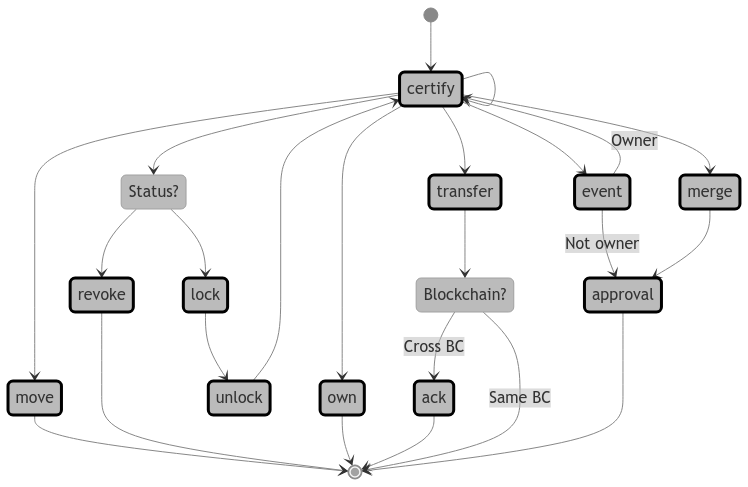
State diagram source (mermaid)
stateDiagram-v2
classDef ope stroke:black, stroke-width:3px
[*] --> certify
certify --> certify
certify --> own
certify --> transfer
certify --> event
certify --> merge
event  --> approval : Not owner
event --> certify : Owner
merge --> approval
certify --> move
certify --> Status?
Status? --> revoke
Status? --> lock
lock --> unlock
unlock --> certify
transfer --> Blockchain?
move --> [*]
revoke --> [*]
own --> [*]
ack --> [*]
Blockchain? --> ack : Cross BC
Blockchain? --> [*] : Same BC
approval --> [*]

class certify, own, merge, transfer, move, event, revoke, lock, ack, unlock, approval ope
Operations list
| Operation HEX | Name | Args | Type | From | To |
|---|---|---|---|---|---|
| 0000 09D3 (2515) | certify | Hash (sha2-256) | Template nonce | Creator | new_ntity |
| 0000 09D4 (2516) | event | Hash (sha2-256) | Template nonce | Owner or Creator | ntity |
| 0000 09D8 (2520) | approval | Transaction hash (TX) of the event to approve | Approval type | Owner | ntity |
| 0000 000F (15) | lock | Optional comment | 0x0 | Owner | ntity |
| 0000 000A (10) | unlock | Optional comment | 0x0 | Owner | ntity |
| 0000 0011 (17) | revoke | Optional comment | 0x0 | Owner | ntity |
| 0000 09D2 (2514) | transfer | Address of the new ntity and of the new owner (both addresses are the same) | Blockchain ID | ntity | new_ntity & new owner |
| 0000 09D5 (2517) | move | Address of the new wallet, same blockchain only | Blockchain ID | ntity | new_ntity |
| 0000 09D6 (2518) | own | Address of the new owner's wallet | Blockchain ID | ntity | New owner |
| 0000 09DB (2523) | merge | Transaction hash (TX) of the last origin branch | 0x0 | Owner | new_ntity |
| 0000 09D7 (2519) | ack | After a merge: transaction hash (TX) of the operation to merge | Approval type | Owner | ntity |
| 0000 09D7 (2519) | ack | Cross-blockchain transfer: optional comment | Blockchain ID | Bridge | new_ntity |
| 0000 05E3 (1507) | template | Ntity template name — never use IPFS for a template | Version | - | - |
certify & event
certify
This is the first possible operation. It writes the base model of any Ntity certificate. It is also possible to use certify to overload existing data according to the CBD model: only the last information is valid. The structure of the certificate is defined by its template, while the structure of an event is much more basic.
event
The event operation is similar to certify; its purpose is to add events to the life of the certified ntity, for example:
- Warranty extension
- Service
- Repair
- …
Event example
N: Event
V: 1
L: json
D:
 T: t
 y: Type
 st: Status
 p: Params (json formatted data)
 c: Comment
 eo: Start date
ec: End date{
"N": "Event",
"V": 1,
"L": "json",
"D": {
"T": "t",
"y": "SYS_VAR_EVENTTYPE_REPAIR",
"st": "SYS_VAR_STATUS_SUCCESS",
"p": {
"Operator": "ID6658"
},
"c": "Wheel XB5 has been replaced",
"eo": "2022-08-05",
"ec": "2022-08-09"
}
}TX1 >{"T":"e","n":"Jordan","f":"Michael","d":"Chicago Bulls"}
TX2 >ETH:TX1|{"d":"Spurs"}
TX3 >ETH:TX2|{"d":"Geneva Lions"}approval
Approval is used to validate a certificate or an event issued by a third-party wallet.
In concrete terms, if you own a watch and have it repaired, the repairer can issue a repair event, but for it to be valid only the owner of the watch can validate this event, using the approval operation.
Approval type
| ID | Decision | Status | Comment |
|---|---|---|---|
| 0000 0019 (25) | Accepted | Published | The event is visible by everyone |
| 0000 001A (26) | Accepted | Private | Only the owner can see the event |
| 0000 0018 (24) | Rejected | Rejected | The event is hidden |
| 0000 001D (29) | Rejected | Spam | All events coming from this address are flagged as spam |
status
Status is a pseudo operation which allows to lock, unlock or revoke a certificate.
An Ntity certificate can have several statuses during its lifetime. By default a certificate is valid until its expiry date, even if it is eternal (ETERNAL). However, in some cases we may need to lock and unlock a certificate for some time, or even revoke it.
Once the revoke status is sent, no more operations are possible and all the following operations are ignored. As described above, only the owner of the certificate can change its status.
transfer
transfer combines the move & own operations into a single one.
- Same blockchain — the sender is the current owner and the receiver becomes the new owner. ack is useless for a transfer on the same blockchain.
- Cross blockchain — a cross-blockchain transfer cannot be done with transfer alone. To keep track of it, the transfer must be acknowledged using ack on the recipient blockchain wallet.
Bridging is done by the official Ntity wallets. The bridge is currently being implemented.
Transfer example
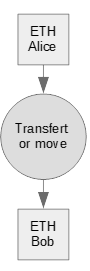
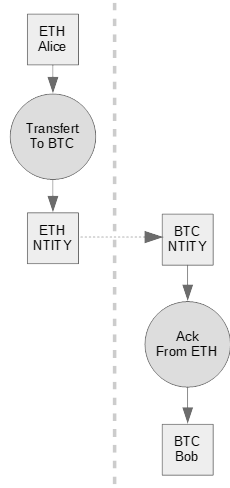
From      : Alice  (wallet and owner)
To        : Bob    (wallet and owner)
Parent TX : TX1

** Step 1 **
            .........1.........2.........3.........4.........5.........6.........7.........8
Datagram  : NTITY 02‹E›|              TX1             |‹T›|        BTC Bob Wallet
Operation : Transfer
From      : Alice wallet
To        : ETH Ntity bridge wallet
Result    : TX2

** Step 2 **
            .........1.........2.........3.........4.........5.........6.........7.........8
Datagram  : NTITY 02‹E›|              TX2             |‹A›|   Optional: ETH Alice Wallet
Operation : Ack
From      : BTC Ntity bridge wallet
To        : BTC Bob wallet
Result    : TX3

Note:
As it is not possible to represent a binary value as a string, we represent it as follows:
‹T› = Transfer
‹A› = Ack
‹E› = Ethereum blockchain ID
move
With move you can move a certificate to another wallet and still keep its ownership, until the own operation is used to change the owner of the certificate.
If you move a certificate to a wallet you do not own, the owner of that wallet can take over the ntity and become its owner by using own.
own
own gives the ownership to another wallet.
The original owner of a certificate is the owner of the signing wallet, and the signatory's wallet can be different from the item wallet. For example, the company MyGem holds the wallet 0xABCD and wants to certify a stone having the wallet 0x1234: the "From" is 0xABCD and the "To" is 0x1234. MyGem remains the owner of the certificate even though it is written on wallet 0x1234.
If own is set to a wallet like 0x00000000…000, the ownership is lost forever.
merge
A merge is a request to bind a certificate that has no connection with the target certificate.
The merge operation must be followed by an ack operation to be validated. Please note that a merge transfers the ownership to the owner of the target certificate.
From      : Owner of Ntity1 (TX1)
To        : Owner of Ntity2 (TX2)

** Step 1 **
            .........1.........2.........3.........4.........5.........6.........7.........8
Datagram  : NTITY 02‹E›|              TX1             |‹M›|            TX2
Operation : Merge
From      : Owner of Ntity1
To        : Ntity1
Result    : TX3

** Step 2 **
            .........1.........2.........3.........4.........5.........6.........7.........8
Datagram  : NTITY 02‹E›|              TX2             |‹A›|            TX3
Operation : Ack
From      : Owner of Ntity2
To        : Ntity2
Result    : TX4

Note:
As it is not possible to represent a binary value as a string, we represent it as follows:
‹M› = Merge
‹A› = Ack
‹E› = Ethereum blockchain ID
ack
Acknowledges a transfer or a merge, using ack on the recipient's certificate. Please refer to the transfer or merge sections for further explanations.
CBD: Cascading Blockchain Datagram
CBD, what's that smoky acronym?
CBD stands for Cascading Blockchain Datagram: all data is overwritten from the first to the last transaction, following 2 simple rules:
- New operations stand in the current wallet.
- Only the operations signed by the current owner are valid.
The operations of a CBD can be linked in 2 ways, serially or in parallel:
- Serial: an operation is linked to the last operation, or to the original certificate if there is no operation yet — for example a production line or following the life of a product.
- Parallel: an operation is linked to the original certificate — for example a vote.
Use case, serial
- The watch factory issues a certify for the brand new watch.
- The factory transfers the certificate to the new owner: the transfer first does a move of the certificate to the new owner's wallet, then an own to define the new owner of the certificate. From then on, the factory has no way to get the watch certificate back.
- The new owner buys a warranty extension. The factory sends and signs the warranty extension and, once the owner accepts it, a new event is created. The data is signed by the factory and the event by the owner.
- The owner sends the watch for service. Exactly like the warranty extension, it creates an event.
- The owner loses the watch: they can broadcast the new status of the watch as locked, with a message like "Stolen!".
- One week later the owner finds the watch in the dishwasher and changes the status to unlocked, with the message "Found :)".
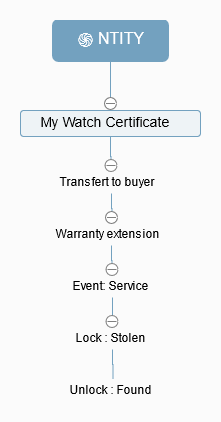
--------------------------------------------------------+-----------+-------------
 NTITY 010010 …HASH… MyWatch>ipfs://Qmd6BG…             | certify   | tx: 0xabc…
 |___ NTITY 021552 … 0xabc… (2514) … 0xOwnerWal         | transfer  | tx: 0x012…
  |___ NTITY 02AAAA … 0x012… (2516) … 0xIpFs123         | event     | tx: 0x234…
    |___ NTITY 02BBBB … 0x234… (2516) … 0xIpFs456       | event     | tx: 0x456…
      |___ NTITY 020000 … 0x456… (15) … Stolen          | lock      | tx: 0x678…
        |___ NTITY 020000 … 0x678… (10) … Found         | unlock    | tx: 0x890…
--------------------------------------------------------+-----------+-------------
Use case, parallel & serial
This example shows how Ntity can be used for raw material processing, making traceability possible and the supply chain simple to implement.
Ntity certificates                          | Transactions
--------------------------------------------+--------------
 NTITY 01… STEEL1                           | tx: 0xabc…
  |___ NTITY 01… >ETH:0xabc…                | tx: 0xdef…
  |___ NTITY 01… >ETH:0xabc…                | tx: 0x012…
    |___ NTITY 01… >ETH:0x012…              | tx: 0x345…
      |___ NTITY 01… >ETH:0x345…            | tx: 0x678…
--------------------------------------------+--------------
In this example the raw steel 0xabc… is split in 2 parts, 0xdef… and 0x012…. The part 0x012… is turned into a 3mm steel bar 0x345…, and the bar into a steel chain 0x678….
From the final Ntity certificate, with the transaction 0x678…, the full supply chain can be rebuilt.
Each piece of information is linked to its parent by a transaction number: the last transaction is linked to its parent 0x345…, which the datagram writes with the blockchain concerned, ETH:0x345…. Parents can obviously be on a third blockchain. Notation examples:
>[Network:TX|]Data
>ETH:0x345…|{"T": "a","y": "123456","v": "Data value"}>[Network:TX|]Data
>ETH:0x345…|ipfs://Qmd6BGV8wA1Wcia3ZWSu4fJtuiQRTEH6s1DBmBc8x5dRZ9